
In short: DMM is IFS's native tool, powerful and free, built for large structured loads. The trade-off is real technical expertise: per-version templates, validation targets, fine-grained mapping, and the occasional silent failure. ERP Control plays elsewhere: no-code, targeted, repeatable operations across your environments (CFG · UAT · TRN · PROD), with no Method List or PL/SQL. These aren't two versions of the same tool, but two philosophies. Here's how to decide.
You need to load or update data in IFS Cloud, and the same question comes back every project: do you stick with IFS's native tools, or pick a dedicated solution? This comparison isn't here to dismiss DMM, which is a good tool. It's here to help you choose based on your team, your volumes and how often you run these operations.
IFS native migration tooling, in one minute
IFS Cloud actually offers several mechanisms, often lumped together as "migration":
- DMM (Data Migration Manager): the modern, IFS-recommended approach. You start from template-based projects, map source tables to target tables, validate in stages (Input, Output, Deploy), then deploy.
- FndMig / "Data Migration": the legacy job-based tool (
CREATE_TABLE_FROM_FILE,MIGRATE_SOURCE_DATA), still widely used, requiring you to configure file, mapping and rules by hand. - The Excel add-in: handy for one-off loads, but limited as soon as you leave the simple case.
These tools are free (included in IFS) and deeply integrated. That's their big strength. The flip side: they assume you've mastered the IFS data model, the _DB columns, the On New / On Modify flags, the Method Lists. That's where projects get stuck.
What DMM does very well
DMM stays the reference tool in several situations:
- you run a structured initial load (version upgrade, new entity, legacy takeover);
- you need to replay a migration identically across environments via a template project;
- you have IFS technical skills in-house or with a partner;
- you want to stay 100% within the IFS standard, with no third-party tool.
For those cases, DMM is powerful and usually the right call.
Where DMM (and FndMig) show their limits
This is the other side, and it's documented by the IFS community itself. Four real examples, all from discussions with a validated answer.
1. Failures that don't announce themselves
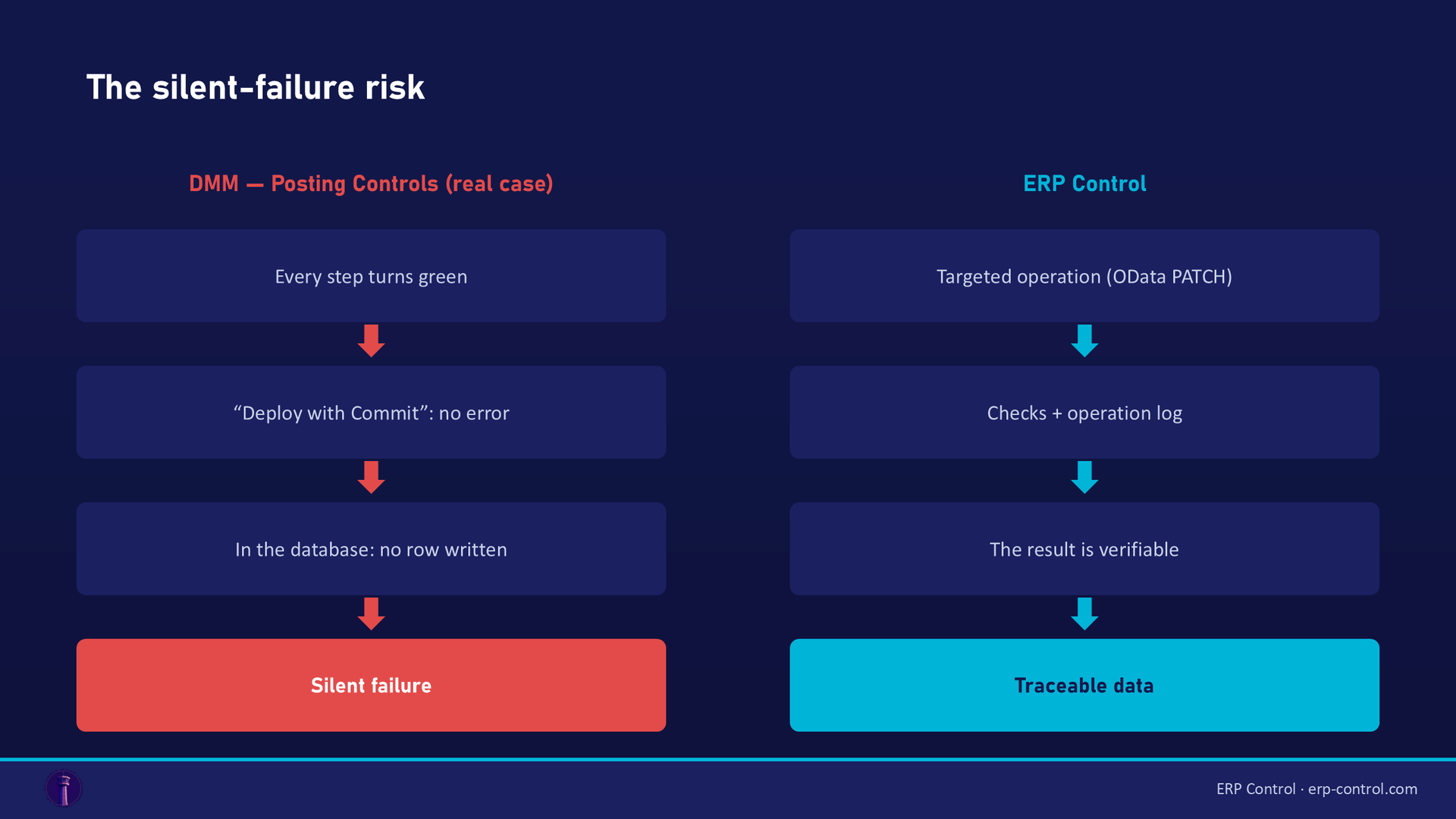
A consultant migrates Posting Controls via DMM. Every step turns green, all the way to "Deploy with Commit", with no error shown. Yet in the database, nothing was written: the tool swallowed the exception that blocked the insert, without surfacing it. A silent failure is the worst case in migration: you believe the data is in place, and you find out much later, in production.
2. The "Validation Target" trap
A team did everything by the book: data mapped, imported, status "Approved". And it still hit a basic data validation error. The cause is anything but obvious. Depending on whether the Validation Target of the target table definition is set or not, DMM validates either against its own container or against the real target table. Until you know that internal behaviour, you go in circles. That's typical of DMM: the logic is consistent, but it requires knowing the inner workings.
3. Templates to manage version by version
To start a DMM project, you often need a Template Project, and that depends on the IFS version. On the community, users swap template files for 23R2, 24R1, and so on, while reporting missing views or templates that don't show up in the "Based On Template Project" list. In other words: there's a setup cost, and it recurs at every version upgrade.
4. FndMig: mapping complexity
On the legacy tool, a telling case: when migrating users, the Description field ends up filled with the concatenation of every field instead of just the name. Diagnosing it means inspecting the column separator, the "column embrace", the TMP_IMPORT_USERS job, the File Configuration tab, the Unpack File button. A simple user import becomes a technical investigation.
The common thread across these four cases isn't that DMM or FndMig are bad. It's that they demand deep expertise of the IFS data model. When you have it, they're powerful. When you don't, every operation becomes a project.
ERP Control vs DMM: the comparison
| Criterion | DMM / FndMig (native IFS) | ERP Control |
|---|---|---|
| Approach | Jobs, templates, table mapping | No-code, by configuration |
| Skills required | IFS data model, PL/SQL, Method List | Functional, no developer |
| Operation type | Structured initial loads, large volumes | Targeted, repeatable operations, updates, configuration promotion |
| Updates | The job sends all mapped columns (ORA-20122 risk on locked fields) | Targeted updates (OData PATCH): only changed fields are sent |
| Multi-environment | Replayable via templates, managed manually | Built-in CFG · UAT · TRN · PROD promotion |
| Error surfacing | Sometimes silent (cf. Posting Controls case) | Checks and operation log |
| Cost | Included in IFS | Dedicated SaaS licence |
| Best for | Heavy takeovers, technical teams | Functional teams, day-to-day operations, cross-environment consistency |
Where ERP Control actually fits
ERP Control isn't a "better DMM". It answers a different need. Where DMM excels at heavy, one-off loads, ERP Control targets the recurring operations IFS teams live with daily:
- promote configuration from one environment to another without re-keying it;
- update data in a targeted way, without fearing insert-only fields (updates only send what changes);
- import / export via Excel cleanly, beyond the simple case;
- all of it no-code, so it's accessible to a functional team, without pulling in a technical consultant for every manipulation.
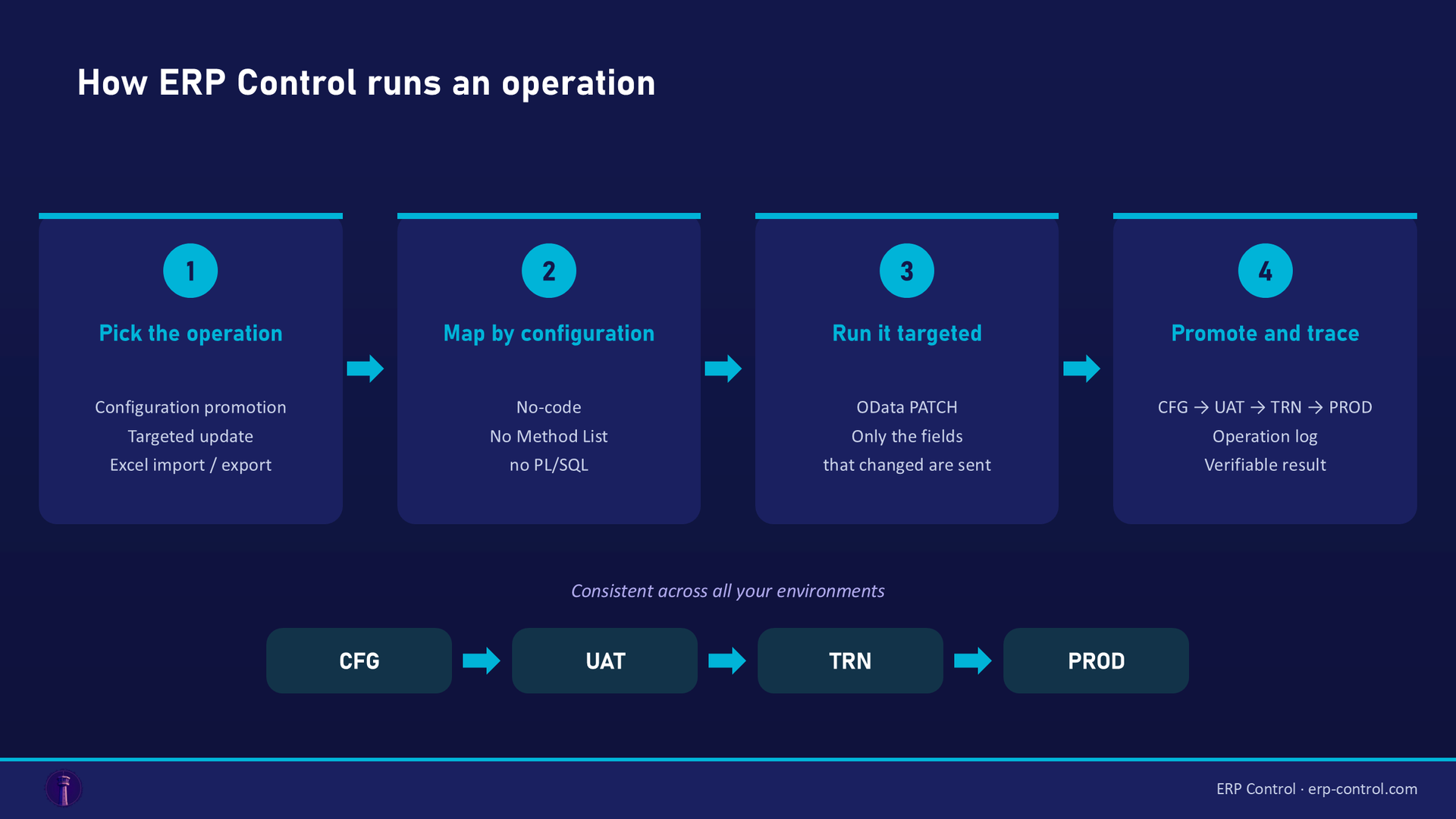
The goal isn't to replace DMM on a massive data takeover. It's to avoid wheeling out the technical artillery for tasks that should be simple, and to make them consistent and repeatable across your environments.
So, which one should you choose?
The real answer comes down to three questions:
- Do you have IFS technical skills available? If yes, DMM is within reach. If not, no-code changes the equation.
- Is it a one-off or a recurring operation? A single takeover justifies the DMM effort. Weekly operations across several environments call for a dedicated tool.
- Is the risk of a silent failure acceptable? In production, traceability and checks aren't a luxury.
Many teams actually use both: DMM for large initial loads, ERP Control for the day-to-day (configuration promotion, targeted updates, import/export). It's not an ideological choice, it's a matter of the right tool for the task.
To understand the mechanics of native migration errors, see our IFS Cloud Data Migration pillar guide; for Excel operations, the IFS Excel Import / Export page.
See how ERP Control simplifies IFS Cloud data operations: explore the migration module.
See ERP Control on your own case
A comparison helps you decide, but the best test is a run on your own data. In a POC, we take a real operation from your environment (configuration promotion, a targeted update, an Excel import) and replay it in ERP Control, no-code. You see the result on your concrete case.
What happens next: a 30-minute call to scope the need, a demo on your data, then you decide. No commitment.
FAQ
Does ERP Control replace DMM?
No, not for massive structured initial loads, where DMM stays relevant. ERP Control addresses targeted, repeatable operations (configuration promotion, updates, import/export) in no-code. The two are complementary.
DMM is free, why pay for a dedicated tool?
DMM is included, but its real cost is the expertise it requires: learning curve, dependence on a technical profile, risk of costly mistakes. A no-code tool pays off when it removes that bottleneck and makes recurring operations reliable.
Can ERP Control avoid ORA-20xxx errors?
Some of them, yes: on updates, ERP Control only sends the fields that actually changed (targeted PATCH), which avoids "may not be modified" rejections (ORA-20122) on locked fields.
Do you need a consultant to use ERP Control?
No, that's the whole point of no-code: operations are done by configuration, with no development and no knowledge of IFS's internal data model.
Sources
Real cases from the IFS community (discussions with a validated answer):