
Quick fix:ORA-20114 … FND_MODIFIEDduring a mass update means the job isn't sending theOBJVERSIONfield — IFS's optimistic lock. Without it, IFS believes the record was modified in the meantime and refuses the update. MapOBJVERSIONin the Source Mapping (with a freshly exported value) and re-run.
You run a migration job to mass-update existing records — say, moving projects from "Initialised" to "Released". Every row returns:
ORA-20114: Project.FND_MODIFIED: The Project record has already been changed. Please refresh the record and reenter your changes.
The confusing part: nobody touched those records. No user logged in, no concurrent job. So who "changed" them?
The symptom
The error appears when executing an update job (status change, mass modification), on records nobody is actually modifying in parallel. The entity name varies (Project, CustomerOrder…) but the pattern is always FND_MODIFIED … has already been changed.
The cause
That's IFS's optimistic lock talking.
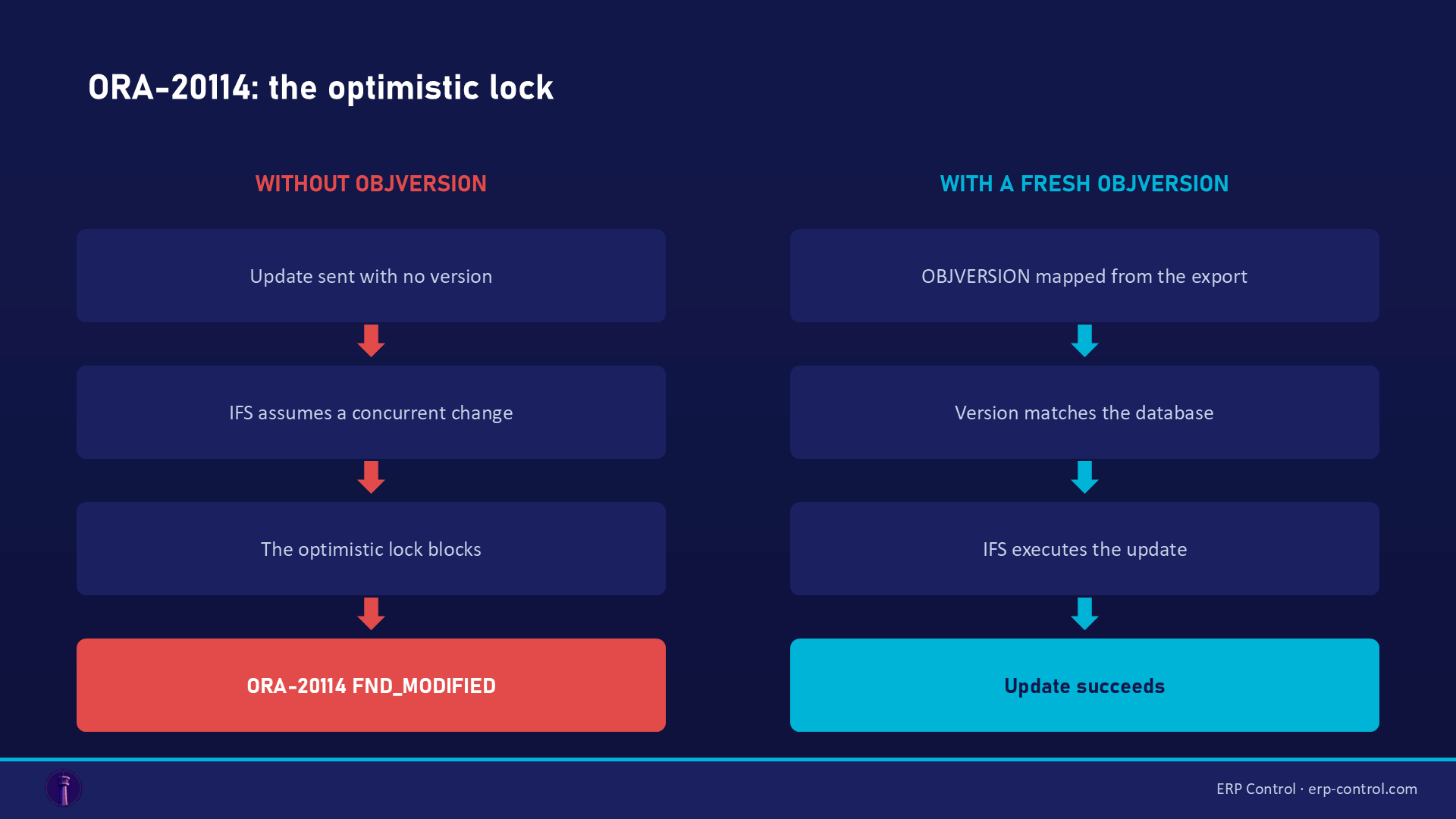
Every IFS record carries a technical field, OBJVERSION: a version timestamp. On every update, IFS compares the OBJVERSION you send with the one stored in the database. If they differ — or if you send none at all — IFS concludes someone modified the record between your read and your write, and blocks to avoid overwriting their changes.
In migration, the cause is almost never a real concurrent modification: it's the mapping that doesn't include OBJVERSION. The job sends a "versionless" update → IFS systematically rejects it.
Real validated case (IFS Community, answer from an IFS Hero confirmed by the author): "based on the hardcopy you missed to map the OBJVERSION field" — adding the mapping immediately resolved the error.
How to fix it
- Open the job, Source Mapping tab.
- Check that the
OBJVERSIONcolumn is present and mapped from your source. - Make sure its value is fresh: export the data (with
OBJVERSION) right before the update. A two-week-old export may already contain stale versions. - Re-run: IFS finds the expected version and executes the update.
If the error persists with OBJVERSION mapped
Then it's a real version collision: something modified the records between your export and your import — another job, a workflow, an integration, or… a previous step of your own multi-method job (method 10 modifies the record, method 20 arrives with the old version). In that case: re-export the OBJVERSION values as close to execution as possible, or chain read+write inside the same job.
How to avoid it
- Always include
OBJVERSIONin exports meant to be re-imported as updates — bake it into your job templates. - Minimize the delay between export and import on live data.
- Freeze concurrent flows (workflows, integrations) during mass updates.
Related IFS migration errors
The same kind of blocker shows up under other codes — all covered in our IFS Cloud data migration pillar guide:
- ORA-20112 FND_RECORD_EXIST — the cousin: there it's the key that can't identify the row; here it's the version that doesn't match.
- ORA-20124 NULLVALUE — a mandatory field the job believes is empty.
- ORA-20111 / FND_RECORD_NOT_EXIST — a missing contextual prerequisite.
- SE_UNAUTHORIZED — the job's projection not granted to the executing user: a migration permissions problem.
For import/export management, see also the IFS Excel Import/Export page.
Mass-update without hand-carrying versions
ORA-20114 exposes the hidden mechanics of IFS updates: to modify 500 projects, you must transport each record's optimistic lock yourself. ERP Control handles it: it reads the record and applies the change in the same transaction (PATCH via the OData API) — the version is always fresh, never an FND_MODIFIED. No-code, no Method List, no intermediate export, across your CFG · UAT · TRN · PROD environments.
See how ERP Control simplifies IFS Cloud migrations — check the migration module.
Part of our pillar guide: IFS Cloud Data Migration — the Complete 2026 Guide.
FAQ
Nobody is modifying these records — why does IFS say otherwise?
Because your job sends no OBJVERSION. To the optimistic lock, "no version" = "unknown version" = potential modification → refusal. Map the field.
Where do I find the OBJVERSION value?
It exists on every IFS view. Include it in your source export (Excel, SQL view): that's the value the job sends back at update time.
OBJVERSION is mapped and the error persists?
Your versions are stale: the records changed since the export (another flow, or a previous step of your own job). Re-export as close to execution as possible.
Sources
Real case from the IFS community (solution validated on the thread):