
Quick fix:ORA-20112 … FND_RECORD_EXISTmeans the migration job couldn't identify the existing row, so it tried to INSERT it again. Switch the job toINSERT_OR_UPDATE, then fix the key in Method List → Method List Attribute: remove the K flag (set it to-) on the key column you're not populating. Then re-run.
You set up a data migration job in IFS Cloud to update existing records. Instead, every row hits:
ORA-20112: EntityName.FND_RECORD_EXIST: The … already exists.
The confusing part: you enabled the Modify option, and the job still refuses to update. Here's what's really happening — and how to fix it.
The symptom
The error appears on Load, Validate or Execute of a migration job, as soon as you target rows that already exist. It takes the form (the entity name changes, the pattern doesn't):
ORA-20112: CustomerInfoAddressType.FND_RECORD_EXIST: The Customer Info Address Type already exists.ORA-20112: ProdStructureHead.FND_RECORD_EXIST: The Prod Structure Head already exists.ORA-20112: WarehouseBayBin.FND_RECORD_EXIST: The Warehouse Bay Bin already exists.
The cause
It's a key mis-match, not a real duplicate.
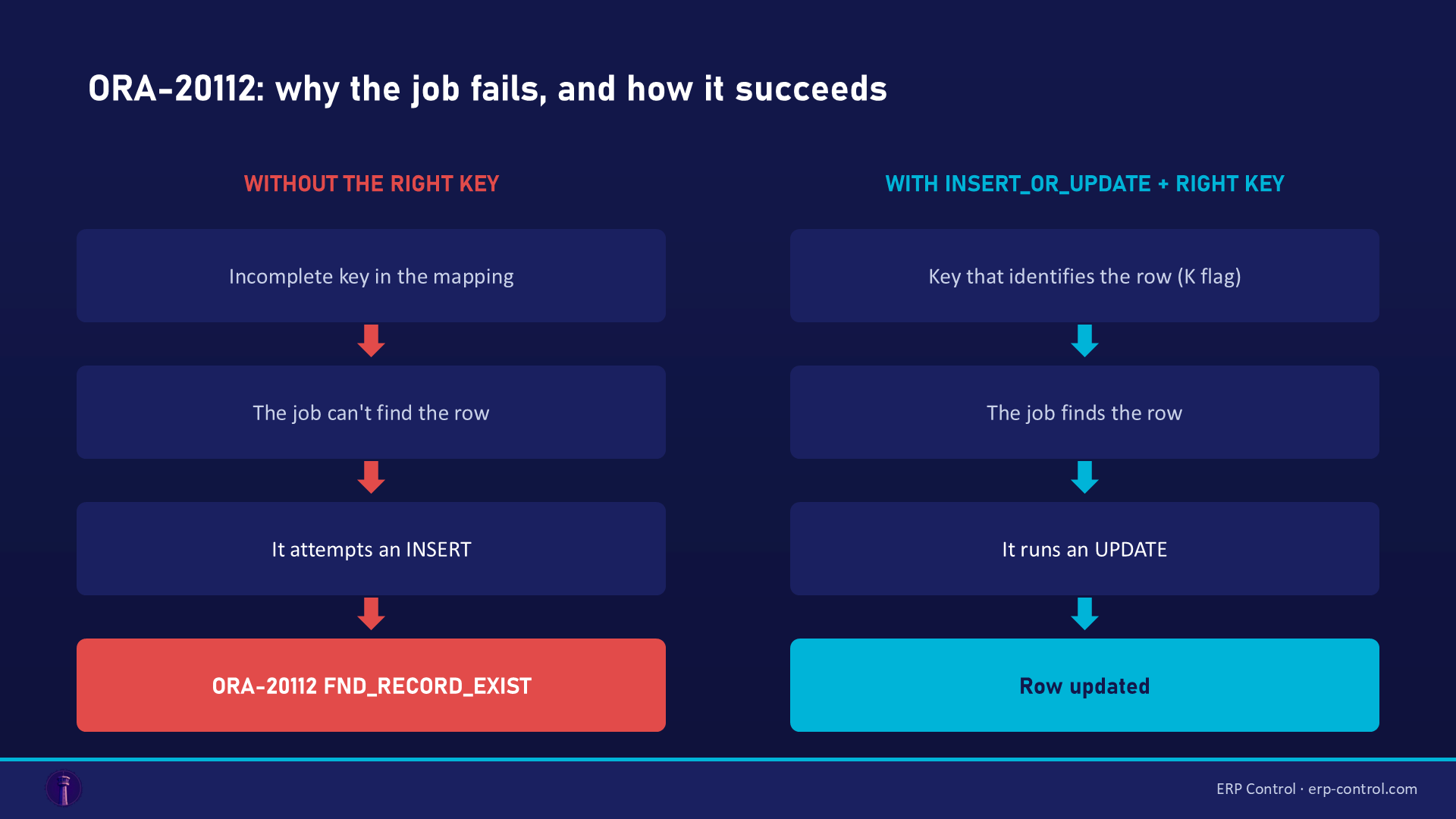
When the migration job can't uniquely identify the existing row, it assumes the row doesn't exist — and tries to INSERT it. That insert collides with the row that's actually there → FND_RECORD_EXIST.
Why can't the job identify the row? Almost always because the key composition in the mapping is incomplete:
- you map only the _DB (database) value of a key column, without the client value (or the other way round);
- or a column is still flagged as a key (K flag) while you're not populating it.
From real IFS Community cases: "the root cause is most likely that the migration job cannot uniquely identify the record and therefore tries to create a new one. Review the key composition (flags P and K)."
How to fix it
Two settings, in this order.
1. Switch the job to INSERT_OR_UPDATE — so it updates the row if it exists instead of always inserting. First confirm the object actually supports modify: some don't, and the option alone never helps if the key is wrong.
2. Fix the key so the job can find the row. This happens in the Method List, not in your data:
- Open Method List → Method List Attribute on the view used by the job (e.g.
CUSTOMER_INFO_ADDRESS,PROD_STRUCTURE_HEAD). - Find the key column you are not feeding from your source — typically the client/_DB twin of the same field (e.g.
BOM_TYPEvsBOM_TYPE_DB, orADDRESS_TYPE_CODEvsADDRESS_TYPE_CODE_DB). - Remove the K flag on that column: change
Kto-(orx). - Make sure the key column you are using is correctly mapped (the API converts the client value automatically from the
_DBvalue when you have a DB / non-DB pair in the primary key). - Re-run Load / Validate: the job now identifies the row and updates it instead of inserting.
Special case: a column fed by an Oracle sequence
If the error comes from a sequence column (e.g. LOCATION_SEQUENCE on WarehouseBayBin), the reflex is different:
- leave the column empty in the mapping (no value, no default) → IFS picks up the sequence automatically;
- or use a two-step job: load the data into the temporary table first, then migrate with MIGRATE_SOURCE_DATA (the sequence is then handled automatically).
Worked example: ProdStructureHead
You're migrating product structure headers (Manufacturing type). The object's key combines CONTRACT ; PART_NO ; ENG_CHG_LEVEL ; BOM_TYPE. The catch: your source only feeds BOM_TYPE_DB (the database value), not the client value BOM_TYPE — so the job can't find the existing header and attempts an INSERT.
- Open Method List Attribute on
PROD_STRUCTURE_HEAD. - Find the
BOM_TYPE(client) /BOM_TYPE_DB(database) pair. - On the column you're not feeding, change the
Kflag to-. - Confirm the job procedure is
INSERT_OR_UPDATE. - Re-run: the job now identifies the header and updates it. (Community-confirmed solution.)
Three real cases (IFS Community)
Same pattern every time, only the entity changes:
- ProdStructureHead (product structures, Manufacturing type) — on already-existing structures,
ORA-20112: ProdStructureHead.FND_RECORD_EXIST. The job can't identify the row because the key is ambiguous: in the mapping, eitherBOM_TYPEorBOM_TYPE_DBis populated, so you must remove the K flag from the one that isn't. Community-validated. - CustomerInfoAddressType (customer addresses,
DEF_ADDRESSfield) —ORA-20112: CustomerInfoAddressType.FND_RECORD_EXIST. Only the_DBvalue ofADDRESS_TYPE_CODEwas passed; you must also feed the client valueADDRESS_TYPE_CODE(the API converts it) so the job finds the row and updates it. - WarehouseBayBin (inventory locations) — the first row inserts, but from the second on:
ORA-20112: WarehouseBayBin.FND_RECORD_EXIST. The culprit is the sequence columnLOCATION_SEQUENCEreusing the same value. Leave it empty in the mapping (IFS generates it), or migrate in two steps viaMIGRATE_SOURCE_DATA.
How to avoid it
- Before running an update job, check the key composition (P and K flags) in Method List Attribute: exactly one key combination should identify the row.
- Never leave the K flag on a column your source doesn't populate.
- Remember the rule: FND_RECORD_EXIST = the job tried to INSERT instead of UPDATE → it's an identification problem, not a duplicate.
Related IFS migration errors
The same kind of block plays out on other codes — all broken down in our IFS Cloud Data Migration pillar guide:
- ORA-20122 "may not be modified" — a field that isn't updatable via the standard API (e.g.
CATALOG_TYPEonSALES_PART). - ORA-20111 / Site.NOTEXIST2 — a missing contextual prerequisite (load headers before lines).
- ORA-20110 — a violated business rule (out-of-range value, or missing setup).
- SE_UNAUTHORIZED — the job's projection not granted to the executing user: a migration permissions problem.
For import/export handling, see also the IFS Excel Import / Export page.
The ORA-20112 Kit (free)
To keep the fix on hand during your migration: a one-page cheat sheet — the cause in plain terms, the fix (INSERT_OR_UPDATE + key), the three real cases (ProdStructureHead, CustomerInfoAddressType, Warehouse Bay Bin) and the avoid-it checklist.
Download the ORA-20112 Kit (PDF) — free, for your email
A look-alike to not confuse
ORA-20112 also appears in a completely different context: the EBR uplift during a version upgrade (e.g. 25R2), with messages like "Prepare_Table_For_EBR error: Table X_TAB cannot be renamed to X_RTB as that table already exists." That's a different problem — custom table renaming during an upgrade, not data migration. If you hit it there, the trail is in the CDB/EBR scripts, not the Method List.
Running migrations without fighting key flags
ORA-20112 / FND_RECORD_EXIST comes from the fine-grained key handling of IFS migration jobs — even with "Modify" enabled. ERP Control removes the problem at the root: it matches the existing row and runs a real update (PATCH via the OData API) instead of a blind INSERT — so no more FND_RECORD_EXIST. All no-code, without touching Method Lists or writing PL/SQL, and consistently across your CFG · UAT · TRN · PROD environments.
See how ERP Control simplifies IFS Cloud migrations — explore the migration module.
Part of our pillar guide: IFS Cloud Data Migration — the complete 2026 guide.
FAQ
Does ORA-20112 FND_RECORD_EXIST mean I have a duplicate?
No. It means the job couldn't identify the existing row and tried to insert it. It's a key/mapping problem, not a real duplicate.
I enabled "Modify" and it still won't update — why?
Because Modify is useless if the key can't locate the row. Fix the key composition (P/K flags) in Method List Attribute.
It works for the first row but fails on the second — why?
Often a sequence issue (the same value is reused). Leave the sequence column empty in the mapping, or migrate in two steps via MIGRATE_SOURCE_DATA.
Sources
Real cases from the IFS community (solutions validated on the threads):
- IFS Community discussion — Prod Structure Head data migration (2025)
- IFS Community discussion — modifying DEF_ADDRESS via data migration (2025)
- IFS Community discussion — Warehouse Bay Bin migration job issue (2023)
- IFS Community discussion — customization uplift steps for 25R2, the EBR look-alike (2025)