
Quick fix:ORA-20111 … does not existmeans IFS can't find a record your row depends on: either a context field missing from the job (e.g.CONTRACT/COMPANY), or a parent object that was never created (e.g. the Part Catalog before the Engineering Part). Add the missing field via Method List → Method List Attribute, or migrate the parent first. The error goes away.
Your IFS Cloud migration job runs, the data is clean… and every row hits a message like:
ORA-20111: Site.NOTEXIST2: The Site object does not exist.
The confusing part: the "missing" object does exist in IFS. The site is there. The part is there. So why does IFS claim otherwise?
The symptom
The error appears on Load or Execute of a migration job (FNDMIG, Excel Migration) or an API call, in several flavors — same pattern, different object:
ORA-20111: Site.NOTEXIST2: The Site object does not exist.(migrating pre-accounting on customer orders)ORA-20111: EngPartMaster.FND_RECORD_NOT_EXIST: The Engineering Part Master does not exist.(creating parts viaENG_PART_REVISION)ORA-20111: ExtLoadInfo.FND_RECORD_NOT_EXIST: The Ext Load Info does not exist.(inserting vouchers via the API)
The cause
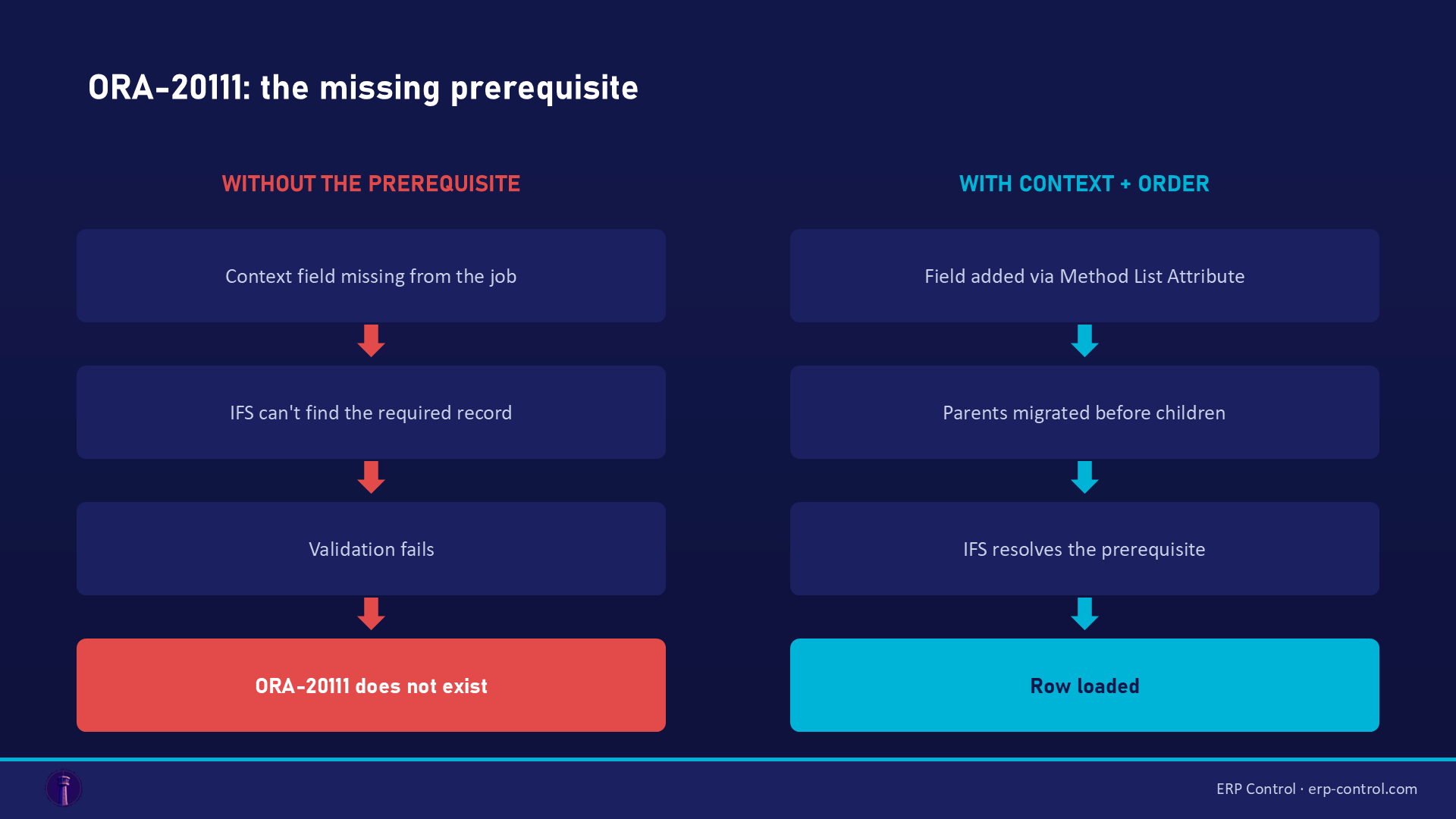
ORA-20111 is not a data error: it's a missing prerequisite. IFS business logic needs a context record to validate your row, and can't find it. Two scenarios:
- The context field isn't passed by the job. Typical example: PreAccounting requires
CONTRACT(the site) andCOMPANY— not as keys, but because the logic uses them to fetch a date and validate code part values. If your job doesn't sendCONTRACT, IFS concludes "Site does not exist" — the site exists, the job just never sent it. - The parent object genuinely wasn't created. In the client, IFS creates some parents automatically (creating an Engineering Part creates the Part master). In a migration job, it doesn't: the job won't chain those implicit creations. Inserting into
ENG_PART_REVISIONwithout a Part master first →FND_RECORD_NOT_EXIST.
Confirmed by real IFS community cases: "the system automatically creates the Part master with Engineering Part creation, however, the system does not create the Part master automatically when creating an Engineering Part using a migration job unless the job is specifically designed to create a Part master first."
How to fix it
Case 1 — missing context field (e.g. CONTRACT on PreAccounting):
- Open your migration job, Method List tab.
- Right-click the method → Method List Attribute.
- Add the missing field (e.g.
CONTRACT) at the end of the list and save — it automatically shows up in the Source Mapping tab. - Map it to your source column and re-run. (Solution validated by the IFS community.)
- If the error persists: also fill in the Attr Seq column (e.g.
20) on the added line — the extra step reported by users on recent versions.
Case 2 — parent never created (e.g. Engineering Part):
- Identify the prerequisite: for an Engineering Part it's the Part Catalog / Part master; for lines, it's the header.
- Create it first: manually, or with a separate migration job executed beforehand.
- Re-run your original job: the parent exists, the row goes through.
Special case — accounting vouchers via API: there is no direct POST on the Voucher entity. Don't fight ExternalVoucheSet row by row: the robust approach validated by IFS consultants is the External Voucher file import (copy and adapt the STDVOU template, switch the delimiter to CSV). Tested up to ~100,000 lines, multi-company, and automatable as a scheduled batch process.
How to avoid it
- Before any job, map the dependencies: which objects does your view reference (site, company, part, header)? Load parents before children.
- Watch out for "invisible" fields: some are neither keys nor visible in the default mapping, yet the business logic requires them (to validate or fetch data). The reflex: compare the Method List with what the IFS screen asks for during manual entry.
- Test with one row before going to volume:
ORA-20111takes 2 minutes to diagnose on 1 row, hours on 50,000.
Related IFS migration errors
The same kind of blocker shows up under other codes — all covered in our IFS Cloud data migration pillar guide:
- ORA-20112 FND_RECORD_EXIST — the exact opposite: the job tries to INSERT a row that already exists (a key problem).
- ORA-20122 "may not be modified" — a field that can't be updated through the standard API.
- ORA-20110 — a violated business rule (out-of-range data, missing basic data setup).
- SE_UNAUTHORIZED — the job's projection not granted to the executing user: a migration permissions problem.
For import/export management, see also the IFS Excel Import/Export page.
Run migrations without fighting prerequisites
ORA-20111 exists because IFS migration jobs don't chain the implicit creations the client does for you — knowing the order and the context fields is on you. ERP Control fixes this at the root: it resolves dependencies between objects and loads data in the right order through the OData API, no-code, no Method List, no PL/SQL — consistently across your CFG · UAT · TRN · PROD environments.
See how ERP Control simplifies IFS Cloud migrations — check the migration module.
Part of our pillar guide: IFS Cloud Data Migration — the Complete 2026 Guide.
FAQ
ORA-20111 says an object doesn't exist, but I can see it in IFS. Why?
Because the job doesn't send it. The object exists in the database, but the field referencing it (e.g. CONTRACT) is missing from your Method List — so as far as the validation logic is concerned, it doesn't exist. Add the field via Method List Attribute.
What's the difference between NOTEXIST2 and FND_RECORD_NOT_EXIST?
Nothing fundamental: two labels for the same mechanism — IFS can't find a required record. NOTEXIST2 usually points at a context object (Site), FND_RECORD_NOT_EXIST at a parent record.
I'm migrating headers and lines: in what order?
Always parents first (headers, masters, catalogs), then children. If one file mixes both, add an Order By clause in the job to force processing order.
Sources
Real cases from the IFS community (solutions validated on the threads):