
In short: In IFS Cloud, security is granted on projections, not on pages. One rule, two opposite consequences: granting a projection opens every page that belongs to it, and granting a page from the navigator does not grant every projection that page actually calls. Add the fact that Create, Update and Delete come bundled, and permission sets stop behaving the way an auditor expects. Here is what the mechanism really does, the workarounds practitioners use, and the wall you hit past a thousand permission sets.
Everyone who builds permission sets in IFS Cloud runs into the same wall, usually twice. First when a user sees pages nobody meant to give them. Then, weeks later, when another user gets blocked in the middle of a screen that was supposedly granted. Both come from the same design decision, and understanding it saves a lot of trial and error.
The rule that explains everything
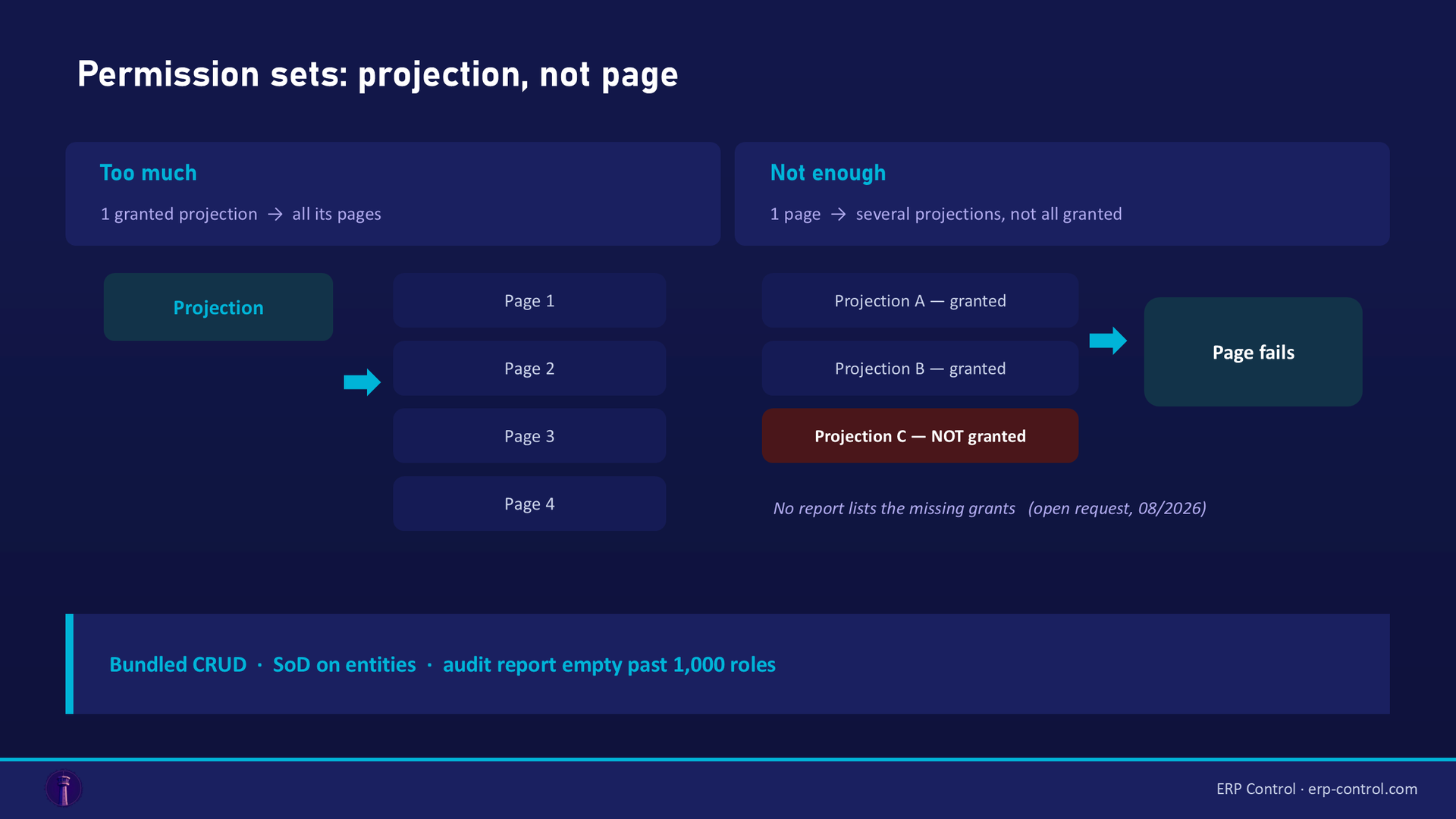
Aurena security is based on projections. Grant a projection to a permission set, and the user gets access to all the pages belonging to that projection.
That answer was given on the community back in 2021, and validated as the solution: there is no page-level grant, and if you want to keep users away from some of those pages, you hide the navigator entries. The question was asked again in April 2026 to check whether recent releases had changed anything. The behaviour still stands.
So a permission set does not describe "what this person can open". It describes "which projections this person can call" — and the pages follow.
Consequence one: you grant more than you meant to
The scenario reported in 2021 is still the everyday one. You want to enable a single function, say Quick Absence. You go to Solution Manager, Security, Permission Sets, then Projections and Lobby Pages, Manage By Navigator, pick the entry, and edit projection access for the selected pages. In the Manage Projection Grants page, only the projection can be granted. Every other page attached to it comes along.
The available answers:
- hide the navigator entries for pages you do not want visible, which is the workaround the accepted answer points to;
- use page configurations with context mapping, which is where practitioners have moved since: map a permission set to a context, then build a page configuration on that context that hides what should not be reachable.
Neither removes the underlying grant. They control what the user sees, not what the user could call. That distinction matters if your auditor asks the question properly.
Consequence two: you grant less than the page needs
This is the mirror problem, and it is the one that costs testing time.
In August 2026 a practitioner filed it as an improvement request on the community, with a reproducible example: create a permission set "by navigator", grant everything under Sales, then open a Customer Order, go to the Involved Parties tab and add a Contact. It fails. Building the permission set from the navigator did not grant every projection that page actually calls.
The request asks for one of two things: that all projections used by a page be granted, or, failing that, a way to find out which projections are not granted. The submitted workaround field says it plainly: no workaround, expensive testing. At the time of writing, the request has had no reply.
Until that changes, the practical approach is to work backwards from what the page calls:
- Command grants are auto-generated from the projection actions a command can call. A validated answer from March 2026 explains it on 25R2 SU3: the system inspects the projection actions invoked in the command execute block, then requires the user to have access to those actions. So a blocked command tells you a projection action is missing, not a page.
- Use the API Explorer to map a projection. Asked in August 2026 how to find which APIs a given projection exposes, practitioners point to the API Explorer, whose sub-section level lists the linked entities; you copy an entity and open it in the Entity screen to go further. That is the closest thing to an inventory of what a page will touch.
The honest summary: IFS gives you the tools to inspect a projection, but not a report that says "this page needs these grants and the user is missing two of them".
The CRUD problem: read, write and delete travel together
A team on 25R1 needed two permission sets on the same objects: one allowing create and modify without delete, another allowing view and modify without create or delete. In Entity Action Grants, CRUD comes bundled: Create, Update and Delete sit on the same line. Several practitioners confirmed the observation on 26R1 as well, including one who corrected his own earlier answer once he re-read the question. Separating Create from Delete is not achievable through Entity Action Grants alone.
The workaround shared in June 2026 goes through configuration rather than security:
- create two permission sets with the same full CRUD access;
- map them to two different contexts (or one global, one in context);
- build a page configuration on each context that hides the actions you do not want available.
An alternative uses a custom field that checks permissions and enables the CRUD actions accordingly, through Page Designer.
Same caveat as before: this hides capability, it does not revoke it. Document that choice before an audit rather than during one.
Segregation of Duties: what it can and cannot check
The Segregation of Duties analysis exists, it is documented, and it works on functional areas and conflicts between them. The nuance is where it looks.
Practitioners running it in 2026 reported the same frustration: it works well on projection actions and entity actions ("Activate", "Apply Bid" and similar), but does not let you flag write access while ignoring read access, because it cannot check a plain CUD entity action grant. One team on 24.2 called the feature unusable for that reason, since view-only access is granted widely and cannot serve as a conflict criterion.
There is an answer to that, given in May 2026 and worth knowing, because it is exactly the question someone asked again in August 2026 and left unanswered:
If you add a projection entity to the functional area, it maps automatically to CUD on that entity, so a read-only user is not flagged. But if you register the whole projection in the functional area, it captures every user granted that projection, read or write alike.
In other words, the read-versus-write distinction is achievable, but only if you build functional areas on entities and actions, never on whole projections. That single sentence saves a fair amount of trial and error.
The wall at a thousand permission sets
Worth knowing before your security overhaul, because it hits precisely when you have done the work properly.
A team on 25R1 SU5, revising their permission sets, ended up with more than 1,100 end-user and functional roles. Their two "Permission Set Grants Reports" quick reports, the ones they use for audit, stopped returning any data. Same reports, same setup, still fine on an environment holding 256 permission sets.
The explanation came from IFS R&D in August 2026: the report models permission sets as columns in a report table, Oracle limits a table to 1,000 columns, and beyond that the table creation fails. The error is swallowed by a WHEN OTHERS block, which creates an empty table instead of raising anything. Hence a report that returns nothing and says nothing. R&D acknowledged the error handling could return a clear message.
Two things to take away. First, an empty audit report is not necessarily an empty permission set list. Second, if your security model is heading past a thousand roles, your audit trail needs to come from somewhere other than that report.
What this means operationally
Put end to end: grants are projection-level, pages are a consequence, visibility is handled elsewhere through contexts and page configurations, CRUD cannot be split, SoD only sees what you modelled at entity level, and the native audit report gives up past a thousand roles.
None of this makes IFS security bad. It makes it hard to see. Most of the work is not deciding who should have access, it is finding out who currently has it, and why.
That is the gap ERP Control's security module addresses: auditing permission sets and grants across environments, comparing them, exporting them for review, and keeping a record of every change. It does not replace the IFS security model, it makes it readable — including past the point where the native report stops answering.
See how ERP Control audits IFS permissions and grants: explore the security and permissions module.
Building a permission set that actually works
- Start from the projections, not the pages. List what the role must call, then accept that the attached pages follow.
- Map what each page touches with the API Explorer before granting, rather than after the first blocked user.
- Test the actions, not the screens: open the page, then run the operations the role really performs, including the tabs, the plus buttons and the commands.
- Handle visibility with contexts and page configurations, and write down that this hides rather than revokes.
- Model SoD functional areas on entities and actions, never on whole projections, if you want read-only access to stay out of the conflicts.
- Keep your own export of grants if you are heading past a thousand permission sets; the native report will stop answering before your auditor does.
- Plan for the rebuild: after an environment refresh, the permission sets you had built in the target are gone with the rest of the configuration — see what a clone replaces.
See ERP Control on your own case
Permissions are the module where a demo is worth more than a description. In a POC, we take one of your permission sets, audit it in ERP Control, and you see what it actually grants across your environments.
What happens next: a 30-minute call to scope the need, a demo on your data, then you decide. No commitment.
FAQ
Can I grant access to a single page in IFS Cloud?
No. Security is granted on projections, and a projection carries all its pages. The validated answer on the community is to hide the navigator entries for the pages you do not want visible, or to use page configurations with context mapping.
Why does a page fail even though I granted it from the navigator?
Because building a permission set from the navigator does not grant every projection the page calls. A practitioner documented the case in August 2026 with Customer Order and the Involved Parties tab; the request for a way to list the missing projections is still open.
How do I find out which projections a page needs?
Through the API Explorer, whose sub-section level lists the entities linked to a projection. Blocked commands are also informative: command grants are auto-generated from the projection actions the command calls, so a failure points at a missing action.
Can I separate Create, Update and Delete in a permission set?
Not through Entity Action Grants, where CRUD is bundled on the same line. The workaround is to grant full CRUD on two permission sets mapped to different contexts, then hide the unwanted actions with a page configuration, or to drive the actions from a custom field through Page Designer.
Why does the Permission Set Grants Report return nothing?
Most likely because you passed a thousand permission sets. The report models roles as table columns, Oracle limits tables to 1,000 columns, and the failure is swallowed, producing an empty table. IFS R&D confirmed this in August 2026.
Sources
Real cases from the IFS community (discussions with a validated or expert answer):
- IFS Community discussion: granting permission by page in Aurena (2021-2026)
- IFS Community discussion: projections used by a page that are not granted (2026)
- IFS Community discussion: where command grants come from (2026)
- IFS Community discussion: separating create, modify and delete access (2026)
- IFS Community discussion: Segregation of Duties in IFS Cloud (2024-2026)
- IFS Community discussion: Permission Set Grants Reports returning no data (2026)
- IFS Community discussion: finding the APIs within a projection (2026)
See also our guide on managing IFS permissions and, when a migration job hits a permission wall, SE_UNAUTHORIZED explained.